

Thermis Tag & AlertTag Indicators
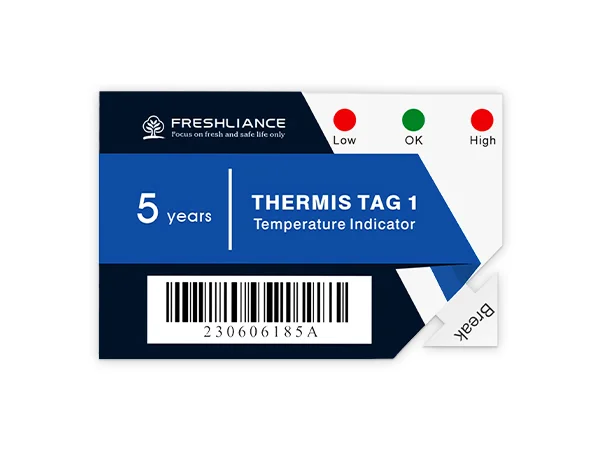
Temperature status at handover
Choose the indication. Match the alarm settings.
Single-use temperature indicators with model-specific LED or LCD status displays and preset alarms for checks during storage and shipment handovers.
Thermis Tag and AlertTag provide local temperature and alarm information for sensitive products. Thermis Tag 1 uses LEDs, while AlertTag T10 and T20 use LCD screens. Their different displays and alarm options let you choose the status information the receiving team needs.
The product family covers several devices with different ranges, alarm counts, and operating periods. Select the individual model and preset thresholds against the requirements of your goods. A displayed alarm provides information for review under your handling procedure.
- Single-useElectronic indicators
- LED or LCDDisplay depends on model
- Preset alarmsSelect the thresholds required
Choose the indicator format
A local status check for the selected conditions.
Review the exact model and alarm configuration before assigning an indicator to a consignment.
Thermis Tag LED indication
Thermis Tag 1 provides LED status and an irreversible alarm indication, with two or seven alarm points available as preset options.
AlertTag LCD information
AlertTag T10 and T20 display temperature and alarm status on a screen, with up to four alarm points for the selected configuration.
Time and temperature criteria
Model-specific alarm settings can assess an immediate event or cumulative exposure. Agree the criteria needed for your receiving checks.
Compact single-use devices
The indicators accompany goods for a defined task. Choose the form factor and working period for the intended shipment or storage use.
Model comparison
Distinct devices. Distinct specifications.
These rows apply only to the named model. A family listing does not imply one shared range, display, or working duration.
- Thermis Tag 1 display
- LED indication
- Thermis Tag 1 range
- −30°C to +70°C
- Thermis Tag 1 alarm options
- Two or seven preset alarm points
- AlertTag T10 display and range
- LCD; −30°C to +70°C
- AlertTag T10 alarm options
- Up to four preset alarm points
- AlertTag T20 display and range
- LCD; −40°C to +70°C
- AlertTag T20 alarm options
- Up to four preset alarm points
- Use type
- Single-use
A receiving routine
Confirm. Activate. Check.
Activation and display interpretation differ by model; follow the instructions supplied with the selected indicator.
Confirm the configuration
Check the model, expiry information, preset thresholds, and any alarm delays against the shipment requirements.
Activate and place
Use the selected model’s activation method and verify its start indication. Place it with the goods at the location defined by your procedure.
Review the indication
Read the LED or LCD status at handover. Record the result as required and follow your product handling procedure when an alarm is shown.
Sensitive goods and handovers
Make the status available where goods change hands.
Select the indicator and configuration for the product, expected conditions, and receiving procedure.

Pharmaceutical consignments
Provide a local temperature alarm check when medicines are received, using preset criteria chosen for the shipment.
Life sciences materials
Review model suitability for sensitive biological materials and diagnostic reagents with defined handling requirements.

Controlled storage handovers
Use a compact indicator with the goods during a defined storage or handling period so the responsible team can review its status.
Product enquiries
Choose the display and alarm criteria.
Tell us the product, required temperature limits, expected monitoring period, and the checks needed at receipt. Celsius can discuss a specific indicator and preset configuration.
Enquire about this productWhat is the difference between Thermis Tag and AlertTag?
Thermis Tag 1 uses LED status indication and offers two or seven preset alarm points. AlertTag T10 and T20 use LCD screens and offer up to four alarm points. Their temperature ranges and working periods also differ, so select a named model for the application.
Are the default alarm limits suitable for every product?
Alarm limits and exposure criteria need to match the requirements of the goods and your handling procedure. Share those requirements before selecting the indicator. Confirm the preset configuration on the supplied unit before activation.