

Tempmate®-XS
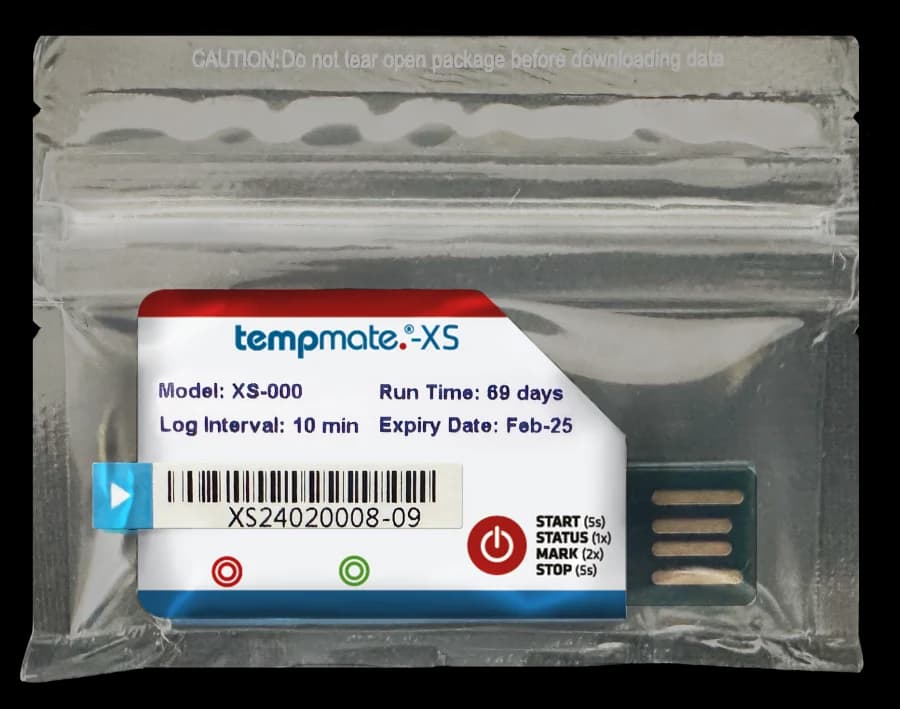
Compact shipment recording
Add a temperature record. Keep handling straightforward.
Compact single-use temperature logger with LED indication, an integrated USB interface, and an automatic PDF summary for shipment review.
The Tempmate®-XS is a small, single-use temperature logger for a defined shipment or recording campaign. Its LED provides local feedback, and the built-in USB interface makes a PDF summary available for review after the journey.
Choose settings and placement around the consignment’s requirements. The product-specific datasheet identifies tempbase 2 as the configuration and full-report software, while the automatic file is a PDF summary. Confirm the required report detail and recording duration before dispatch.
- −10°C to +70°CSpecified temperature range
- Up to 70 daysCondition-dependent recording
- USBPDF summary access
Focused temperature recording
Small format. A defined recording task.
Match the logger with the journey and the information required at receipt.
Compact body
The 48 × 30 × 9 mm format weighs 8.6 g and can be included at the agreed location in a consignment.
Temperature record
Collect readings during a single recording campaign, with up to 10,000 stored measurement points.
USB summary
Read the automatic PDF summary through the integrated USB interface; tempbase 2 provides the full report.
LED indication
Use the device indication alongside the instructions to check activity and status.
Technical details
Check the range and report requirements.
Manufacturer specifications. Recording duration varies with temperature and logging interval.
- Usage
- Single-use temperature logger
- Temperature range
- −10°C to +70°C
- Temperature accuracy
- ±0.5°C from −10°C to +40°C; ±1.0°C elsewhere in range
- Temperature resolution
- 0.1°C
- Memory
- 10,000 measurement points
- Recording duration
- Up to 70 days, depending on temperature and logging interval
- Default interval
- 10 minutes
- Battery
- CR2032, non-replaceable
- Protection
- IP67
- Reporting
- Automatic PDF summary; full report through tempbase 2
From dispatch to review
Plan the record before the journey.
Follow the supplied instructions for the configuration and status indications of your unit.
Confirm & start
Check the supplied settings, expiry information, and suitability for the journey, then activate the logger using its start control.
Place & record
Put the activated device at the position defined by your monitoring procedure and identify it with the consignment.
Retrieve & review
Stop the campaign according to the instructions and connect through USB. Save the summary and use tempbase 2 when the full report is required.
Shipment applications
A recording point for one-way consignments.
Discuss the goods, expected conditions, and receiving process when assessing suitability.

Food and produce journeys
Add a temperature history to a consignment and establish who will retrieve and review the record on arrival.
Controlled distribution
Assess the range and configuration against product requirements, with a defined logger location and shipment reference.

Receiving checks
Connect the device record with handling decisions under your own procedures, using the full report where additional detail is needed.
Product enquiries
Define the journey and the record you need.
Share the expected temperature range, shipment duration, alarm requirements, and report workflow so we can discuss the XS for your application.
Enquire about this productWhat kind of report does the XS provide?
The product-specific datasheet states that the XS generates an automatic PDF summary. The full report is available through tempbase 2 software. Confirm which level of detail your receiving and record-retention procedures require.
How should I assess it for a planned journey?
Compare the expected conditions with the specified range and allow for the recording duration and selected interval. The stated maximum is up to 70 days and depends on operating conditions. Share the journey and alarm requirements with Celsius before selecting the configuration.