

Tempmate®-i1
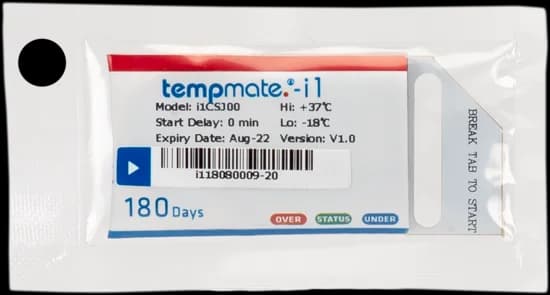
Temperature status at receipt
A compact indicator. A practical receiving check.
Check temperature-sensitive consignments with a compact, single-use electronic indicator featuring three status LEDs and break-off activation.
The Tempmate®-i1 accompanies temperature-sensitive goods and indicates whether the configured limits have been breached during the journey. The receiving team can read its three LEDs directly, without connecting a reader or opening software.
Match the preconfigured alarm limits to the requirements of your products and handling procedure. The device’s measurement range describes its capability; the selected alarm settings determine the conditions assessed for your consignment.
- −20°C to +50°CMeasurement range
- Up to 180 daysOperating duration
- 3 LEDsTemperature status
Designed for straightforward handling
Practical details for everyday shipments.
A focused temperature indicator for one-way journeys and quick checks at receipt.
Ready to activate
Supplied preconfigured, with a break-off tab to begin operation. Confirm the selected settings before dispatch.
Visible feedback
Three LEDs provide a local status indication. Consult the product instructions when interpreting the result.
Compact format
A 50 × 33 × 5 mm body weighing approximately 10 g keeps the indicator easy to include with a consignment.
Protected housing
Rated IP67 / NEMA 6, with PA/PE packaging specified in the manufacturer’s datasheet.
Technical details
Know the device before it travels.
Manufacturer specifications. Confirm the alarm configuration and expiry date for the supplied unit.
- Device type
- Single-use electronic temperature indicator
- Measurement range
- −20°C to +50°C
- Temperature accuracy
- ±0.5°C
- Temperature resolution
- 0.1°C
- Measurement interval
- 1 minute
- Operating duration
- Up to 180 days
- Activation
- Break-off tab
- Status indication
- Red, green and blue LEDs
- Alarm events
- Single or cumulative, depending on configuration
- Dimensions
- 50 × 33 × 5 mm (L × W × H)
- Weight
- Approximately 10 g
- Protection
- IP67 / NEMA 6
From dispatch to receipt
Three steps. One clear routine.
Use the manufacturer’s instructions alongside your shipment handling procedure.
Prepare & activate
Check the expiry date and configuration, bring the indicator to operating temperature, then break the tab to start.
Place with the shipment
Attach the activated indicator to the consignment in the location defined by your monitoring procedure.
Check on arrival
Read the LED status at receipt and follow your handling procedure if a temperature alarm is indicated.
Temperature-sensitive journeys
Add temperature status to your receiving routine.
Celsius can help assess the selected configuration against your product requirements, journey and receiving procedure.

Pharmaceutical shipments
Check the indicated temperature status of pharmaceutical consignments at receipt, using alarm limits selected for the product and handling procedure.

Food & produce distribution
Place a compact indicator with perishable goods so receiving teams can review temperature status when the consignment changes hands.

Sensitive chemical products
Assess suitability for chemical consignments with defined temperature requirements, using a configuration appropriate to the product and journey.
Product enquiries
Choose the configuration your goods need.
Share the product, required temperature limits, expected journey and quantity. Our team can discuss a suitable preconfigured option for your shipment checks.
Enquire about this productCan the Tempmate®-i1 be reused?
No. It is a single-use indicator. Once activated, it cannot be stopped and restarted for another shipment. Use a new unit for each journey.
Which temperature limits should I choose?
The alarm limits should match the requirements of your goods and handling procedure. Share the required range, journey duration and any delay requirements with Celsius so we can discuss the appropriate preconfigured option.